What Does an ERP Implementation Look Like for an eCommerce Business?
You've decided your eCommerce business needs an ERP platform. Maybe you've already chosen Acumatica, or maybe you're still comparing options. Either way, some questions might be coming up: What actually happens between signing up and going live? How long will it take? What will your team need to do? And the question that keeps eCommerce owners up at night: Will your online store go down during the process?
At Stellar One, we specialize in implementing Acumatica for eCommerce businesses running on BigCommerce, Shopify, and WooCommerce. We've guided dozens of businesses through this exact process, and the most consistent thing we hear from members after go-live is: "That was less disruptive than I expected." The reason is simple: A well-run eCommerce ERP implementation shouldn't interrupt your business, but run alongside it.
This article walks through the implementation process phase by phase so you know exactly what to expect. We'll cover what your partner will handle, what your team needs to contribute, and where eCommerce implementations differ from other industries.
Your eCommerce Storefront Will Stay Live the Entire Time
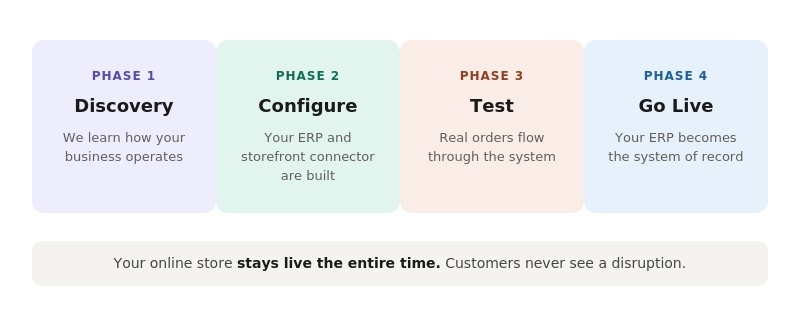
This is the single most important thing to understand, so we're putting it first: Your BigCommerce, Shopify, or WooCommerce store will not go down during ERP implementation. Your customers can continue to browse, order, and check out without interruption. Nothing about the implementation process will touch your live storefront. Orders will keep flowing, and revenue will keep coming in.
The ERP platform is being built and configured in a separate environment. It won't connect to your live store until you're ready. And even when it does connect, the integration will run in the background.
In other words, there's no cutover that requires turning off your website. This process is fundamentally different from a storefront migration (like switching from Shopify to BigCommerce), which does involve rebuilding your customer-facing site. An ERP implementation is a back-office project, and your front office will keep running.
The Four Phases of an eCommerce ERP Implementation
Every partner structures their process slightly differently, but most ERP implementations for eCommerce brands follow four phases. Here's what each one involves and what your team's role will be in each.
Phase 1: Discovery and Planning
This is the stage where your implementation partner will learn how your business actually operates. They'll want to understand your current systems (QuickBooks, spreadsheets, third-party tools, etc.), your order volume and channels, your warehouse setup, and the specific pain points that brought you to an ERP platform in the first place.
Your team's role: Be available for discovery conversations. The people who know your day-to-day operations best (your order processor, your warehouse lead, your bookkeeper) are the most valuable voices in this phase. The more clearly your partner understands your workflows, the better the system will be configured to support them.
For eCommerce businesses specifically, this phase will also include decisions about your storefront connection, like which eCommerce platform you're integrating, what data needs to sync in each direction, and how frequently you want orders to flow from your store into the ERP solution.
Phase 2: Configuration and Data Migration
This is the most hands-on phase for your partner. They'll configure the ERP platform based on what they learned in discovery, setting up your chart of accounts, item catalog, customer records, warehouse locations, and financial settings. If you're moving from QuickBooks, this is when your historical financial data and transaction history will be migrated into the new system.
Your storefront connector will also be configured during this phase. With an ERP platform like Acumatica that offers native integrations for BigCommerce, Shopify, WooCommerce, and Amazon, the connector setup is configuration-based, meaning your partner will be mapping fields and toggling settings rather than writing custom code. If you're using a platform that requires a third-party connector like Celigo, this phase will involve more development work and typically take longer.
Your team's role: Validate the data. Your partner will do the heavy lifting on migration, but your team will need to review the imported data to confirm that customer records, product catalogs, and financial history look correct in the new system. Nobody knows your data better than you do.
Phase 3: Testing and Training
Before anything goes live, you'll test. This is where the ERP platform connects to your storefront in a test environment and your team watches real data flow through the system. Orders will sync from your store into the ERP solution. Inventory will allocate. Financial entries will record. Your team can verify that everything works the way they expect before it counts.
Training happens alongside testing. Your team will learn how to process orders in the ERP, how to check the sync history log for any issues, and how to use the dashboards and reports that replace the spreadsheets and manual reconciliation they've been doing until now.
Your team's role: This is the phase where your team's time commitment is highest. They need to attend training sessions, practice using the system, and flag anything that doesn't match their expectations. The investment here will pay off directly in how smoothly go-live runs. A team that's practiced in the test environment will move into live operations with confidence rather than anxiety.
Phase 4: Go-Live and Stabilization
Go-live is the moment your ERP platform becomes the real system of record. Orders from your storefront will start flowing into the live ERP. Your team will process them there instead of in QuickBooks or spreadsheets. Inventory will track against live transactions.
The first few days after go-live typically involve close support from your implementation partner. They'll monitor the connection, help your team resolve any edge cases that didn't surface during testing, and make adjustments as needed. Some partners offer a formal stabilization period; at Stellar One, your dedicated Member Success Manager stays with you through this phase and well beyond it.
Your team's role: Use the system. The biggest risk at go-live isn't technical. It's people reverting to old habits. If someone starts entering orders into QuickBooks "just in case," you'll end up with the dual-system problem that the ERP was supposed to eliminate. The key is committing to the new system and trusting the training you've done. For a deeper look at what happens after this point, our article on your first 90 days on Acumatica as an eCommerce business picks up exactly where go-live ends.
How Stellar One's ERP Deployment Process Differs
The four phases above describe how most ERP partners structure an implementation. It's a proven sequence, and if you're evaluating multiple partners, that framework will give you a reliable baseline for what to expect.
Stellar One's process compresses and overlaps several of those steps. Rather than completing a full discovery phase before any data enters the system, we'll import your master data within the first few days. That means you'll be working inside a functioning ERP site with your own business data almost immediately, not waiting weeks to see what the system looks like with real information in it.
The practical effect is that discovery and evaluation happen together. Instead of describing your workflows in a conference room and hoping the configuration matches, your team can see how your actual orders, products, and financial records behave in the system while it's still being refined. Questions that would normally surface during a separate testing phase will get caught earlier because you'll already be hands-on. For a closer look at how that process works step by step, check out our article How Stellar One's Free Implementation Works for details.
Not every business fits this model. Companies with significant data cleanup needs, like an unstructured chart of accounts or years of inconsistent records in QuickBooks, may need to do foundational work before data can go in. But for eCommerce businesses with reasonably clean data, the compressed timeline means you can go from signing up to working in a live system in a fraction of the time the traditional sequence would take.
The eCommerce Inventory Cutover: When Do You Trust the New Numbers?
This is a question unique to eCommerce implementations, and it's worth addressing directly because it causes more anxiety than almost anything else in the process.
During implementation, your old system (QuickBooks, spreadsheets, or whatever you've been using) is still tracking inventory. At some point, the ERP becomes the source of truth and the old system stops being authoritative. When does that switch happen?
The answer is go-live, but with a safety net. Your implementation partner will import your current inventory counts during the configuration phase, and your team will verify those counts are accurate. Once the connector goes live, every order that comes through your storefront will automatically adjust inventory in the ERP. At that point, the ERP's numbers are the ones to trust because they're updating in real time against actual orders. The old system's numbers will immediately start drifting because they're no longer receiving the same inputs.
The transition works best when it's clean: go-live day is the day you stop looking at the old system for inventory and start looking at the ERP. Some businesses prefer to run a physical count close to go-live to make sure the starting numbers are solid. That's a smart move, but it's not always required, especially if your existing inventory tracking has been reasonably accurate.
How Long Does an eCommerce ERP Implementation Take?
Timelines vary by partner and by the complexity of your business, but for a small to midsized eCommerce company, a well-structured implementation can typically be completed in 90 days or less. Larger or more complex businesses with multiple warehouses, custom workflows, or heavy integration requirements may need longer.
At Stellar One, our implementation process is designed to move quickly without cutting corners. We've found that shorter timelines create better outcomes because they keep teams focused, reduce decision fatigue, and get businesses to value faster. Long, drawn-out implementations don't reduce risk. They increase it by letting momentum die and priorities shift.
The biggest variable in timeline is usually not the partner's work. It's your team's availability. Implementation requires real time from your people for discovery calls, data validation, testing, and training. If those sessions get pushed repeatedly, the timeline stretches. Protecting that time is the single most important thing you can do to keep your implementation on track.
Your Next Steps for Starting an eCommerce ERP Implementation
An ERP implementation for an eCommerce business is a back-office project, not a storefront project. Your online store will stay live. Your customers won't notice. The process follows a predictable arc from discovery to configuration to testing to go-live, and your team's role at each phase should be clear and manageable.
The businesses that have the smoothest implementations are the ones that commit their team's time to the process, trust the testing phase, and make a clean break from the old system at go-live. The technology is straightforward. The human side is what makes or breaks it.
If you're still deciding which ERP platform is right for your eCommerce business, our guide to the best ERP platforms for eCommerce will be a strong starting point.
At Stellar One, our Free Implementation means you can experience the full process, including data import, storefront connection, and live testing, before you pay a monthly subscription. If you want to see what implementation looks like with your actual data and your actual eCommerce store, we'll build it for you. No cost, no commitment, just click below.
Frequently Asked Questions About eCommerce ERP Implementation
Will my eCommerce website go down during ERP implementation?
No. Your BigCommerce, Shopify, or WooCommerce storefront will stay fully operational throughout the entire implementation. The ERP platform is configured and tested in a separate environment. Your customers won't experience any disruption to browsing, ordering, or checkout at any point during the process.
What do I need to prepare before implementation starts?
The most important preparation is getting the right people available. Your order processor, warehouse lead, and bookkeeper (or whoever manages your finances) will be the most valuable contributors during discovery and testing. On the data side, having a clean and current chart of accounts, an accurate product catalog, and a recent inventory count will help your implementation partner move faster during configuration.
Can I run QuickBooks and the ERP solution at the same time during my ERP implementation?
During implementation, yes. QuickBooks will remain your live system until go-live day. After go-live, you should transition fully from QuickBooks to the ERP solution. Running both systems simultaneously after go-live will create duplicate work and conflicting data.