Your First 90 Days on Acumatica as a BigCommerce Business
You've made the decision. Your BigCommerce store is connected to Acumatica, you've gone through implementation, and now you're live. The old way of doing things (QuickBooks, spreadsheets, manual order entry) is behind you. But what happens next? How long will it take before your team feels comfortable? When will you start seeing the operational improvements you signed up for? And what should you actually be paying attention to in those first few months?
At Stellar One, we've walked dozens of BigCommerce businesses through this exact transition. As an Acumatica Gold-Certified Partner specializing in eCommerce, we've seen the patterns that repeat across every go-live: the early adjustments, the trust-building moments, and the point where everything clicks. The timeline is more predictable than you might think.
In this article, we'll walk you through what to expect in each of the first three months after your BigCommerce store goes live on Acumatica. Whether you're about to go live or you're evaluating whether this is the right move for your business, this will give you a clear picture of the journey ahead.
Before Day One: What Should Already Be in Place for Your Acumatica BigCommerce ERP Go-Live
By the time you go live, a few things should already be working. Your native BigCommerce connector will be configured and tested. Your team will have had the chance to see real BigCommerce data syncing into Acumatica during implementation.
Core financial settings, inventory configurations, and user permissions will be set up. And if you're working with Stellar One, your historical data will already be migrated into the system through our Unified Data Package, giving you access to past orders and customer records from day one.
The important point here is that go-live should not feel like a leap into the unknown. You will have already tested the connection, seen orders flow, and verified that the basics work. Day one is about running your business on the new system, not about hoping the new system works.
Month One: Verifying Your BigCommerce and Acumatica Connection
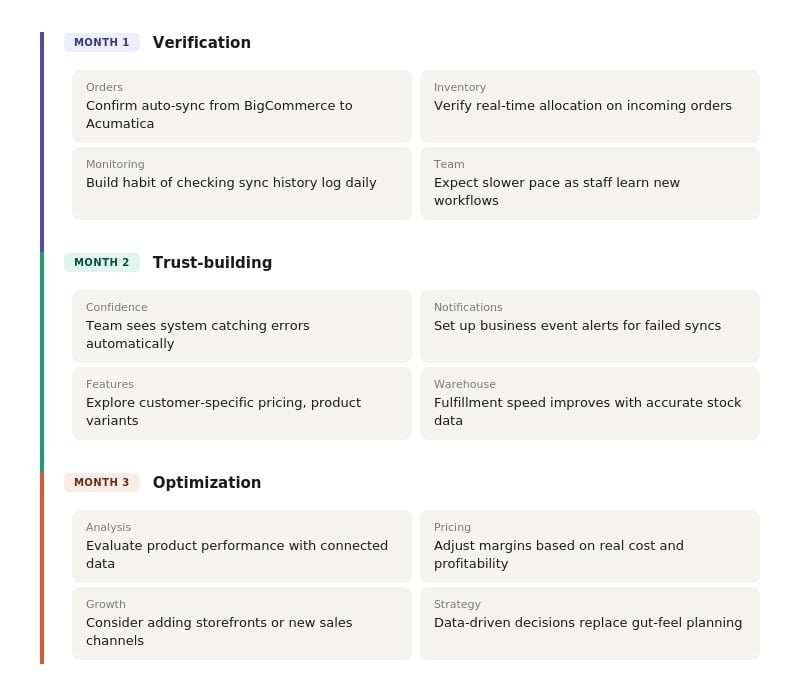
The first 30 days are about making sure everything is working the way it should. The BigCommerce connector will be live, orders will be flowing from your storefront into Acumatica automatically, and inventory will be allocated in real time against incoming orders. Your team should not need to do any double data entry between systems.
That said, the first month is when small sync issues will surface, and that's completely normal. An order might not sync because of an incomplete shipping address. A product might fail to match because it was set to inactive. A customer record might be missing a required field. These aren't signs that something is broken. They're the kind of edge cases that every integration encounters with live data.
The most important habit your team can build in month one is checking the sync history monitor. This is a dashboard inside Acumatica that will show you exactly which transactions synced successfully and which ones need attention. It will tell you not just that an order failed, but why it failed. You can even set up business event notifications that will send your team an email when orders don't sync, so nobody will have to remember to check manually.
Expect your team to move a bit slower than usual during this period. They're learning a new system while still running the business, and that's a real adjustment. The goal for month one isn't peak efficiency. It's verification: confirming that data is flowing correctly, orders are being processed, and the connection between BigCommerce and Acumatica is doing what it's supposed to do.
Month Two: Building Trust in Your BigCommerce ERP Connection
By the second month, something important will start to happen: Your team will begin trusting the system. This is the shift from "is it working?" to "this is actually catching things I would have missed."
Order processors who previously spent time manually tracking down discrepancies between BigCommerce and QuickBooks will start to see Acumatica flag issues automatically. Instead of discovering a problem days later through manual reconciliation, the system will surface it in real time with a clear explanation of what went wrong. That's often a significant moment for teams that have spent years doing this work by hand.
Is Your Business Ready for a Real ERP System?
Find out if you've outgrown your current setup and what you actually need from an ERP system. Quick quiz, honest answers about where you stand.
Month two is also when teams typically start exploring features they didn't activate at go-live. During implementation, the priority is getting a minimum viable setup running: orders flowing, inventory syncing, financials recording. But Acumatica's BigCommerce integration can support more advanced capabilities, and month two is often when businesses begin turning those on. Depending on your business model, that might include:
Customer-specific pricing for B2B accounts, so wholesale buyers will see their negotiated rates when they log into your BigCommerce storefront
Product variant syncing to keep complex product configurations aligned between your store and your ERP platform
Custom order metadata that will flow from BigCommerce into Acumatica, capturing fields specific to your business that standard sync doesn't cover
Promotional pricing and discount rules managed in Acumatica and reflected on your BigCommerce site automatically
Not every business will need all of these, and there's no rush. The point is that month two is when you can start moving beyond the basics because the basics will have become stable.
Month Three: Optimizing Your BigCommerce Operations on Acumatica
By the third month, your team should be operating with confidence. Orders will be syncing without surprises. Inventory will be accurate. Your finance team will have real-time visibility into transactions without the end-of-month reconciliation scramble. The system will no longer be new. It will have become how your business operates.
This is when the focus shifts from making the system work to making the system work harder for you. With two to three months of live data flowing through Acumatica, you can start doing the kind of analysis that wasn't possible before:
Which products are selling best across your BigCommerce store and other channels, and which ones should you be investing more in?
Where can you adjust pricing to improve margins based on real cost and profitability data?
Are there fulfillment bottlenecks that the data can help you identify and resolve?
Is it time to run promotions, and if so, which products and customer segments should you target?
Some businesses also begin strategic conversations at this stage about expanding their BigCommerce presence. If you started with a B2B storefront, maybe the B2C side of your business is growing and it's time to stand up a second BigCommerce storefront. If you've been selling on one channel, maybe it's time to add Amazon or a wholesale option. These are decisions you can now make with data backing them up instead of relying on gut feeling.
How Your Warehouse Operations Will Change With Acumatica and BigCommerce
One of the most immediate and visible improvements will happen in your warehouse, and it's worth calling out separately because it will affect your customers directly.
If your previous setup was BigCommerce and QuickBooks, or BigCommerce with no connected back-office system at all, your inventory likely wasn't syncing automatically. Someone on your team was manually updating stock counts, and those counts were probably inaccurate more often than anyone wanted to admit. Overselling, stockouts, and shipping the wrong quantities are common symptoms of this disconnect.
With Acumatica's native BigCommerce connector, inventory will allocate against orders the moment they come through. When a customer places an order on your BigCommerce store, Acumatica will immediately reserve the inventory so that it can't be sold elsewhere. Your warehouse team will know exactly what's available, what's committed to open orders, and what needs to ship. The actual inventory count won't decrement until the warehouse team picks, packs, and ships the order, keeping your numbers precise at every stage.
The downstream effect of this accuracy is faster fulfillment. Your warehouse team won't need to manually track down quantities or wonder if stock levels are current. Orders will flow from BigCommerce to Acumatica to the warehouse floor with no human intervention in between. For your customers, that can translate into shorter shipping times, fewer canceled orders, and a better overall experience. That's ROI your customers will feel, even if they never know the system behind it.
What Makes This Process Different With Stellar One
Everything described in this article applies to any Acumatica implementation with a BigCommerce connection. But three things are specific to how Stellar One handles this process:
We’re building a proprietary data connection tool that will allow BigCommerce businesses to enter their store credentials into a secure portal and have their BigCommerce data pulled directly into Acumatica in minutes. With other partners, this data import process is likely to take a week or more of manual work through Excel spreadsheets. That time savings significantly can compress your overall implementation timeline.
Stellar One is building a way to spin up a BigCommerce sandbox during your Free Implementation so you can actually see the connection between your BigCommerce store and Acumatica working with your data before you go live. That means fewer surprises on day one, because you will have already tested the sync, reviewed the order flow, and verified that everything is working the way you expect.
Your dedicated Member Success Manager will be with you throughout these 90 days and beyond. You won't be handed off to a different support team after go-live. The same people who built your system will be the ones helping you optimize it.
These tools and support structures are designed to make the first 90 days as smooth as possible. But no matter which Acumatica partner you work with, the overall arc of those first three months will follow a similar pattern.
Your Next Steps After Your BigCommerce ERP Go-Live
The first 90 days on Acumatica as a BigCommerce business will follow a clear arc: Verify that the connection works, build trust as your team sees the system catching things they used to miss, and then optimize as you gain confidence and data. It's a progression, not a switch you flip, and the businesses that approach it with that mindset will see the smoothest transitions.
The operational improvements, including accurate inventory, automated order processing, real-time financials, and faster fulfillment, will start showing up almost immediately. But the full strategic value, such as data-driven pricing decisions, channel expansion, and long-term forecasting, will build over time as your system accumulates the connected data your old tools could never provide.
If you haven't gone live yet and you're still evaluating whether Acumatica is the right fit for your BigCommerce store, our comparison of Acumatica vs. NetSuite for BigCommerce businesses will help you weigh your options. You might also want to understand how the implementation process itself works before you get to day one.
At Stellar One, our Free Implementation will let you experience Acumatica working with your own BigCommerce data before you pay a monthly subscription. You can see the native connector in action, test order flows with your real products, and know exactly what day one will look like before you commit. If you're ready to see it for yourself, click below to start your Free Deployment.
Get a Complete ERP Deployment at Zero Cost
We'll set up your Acumatica site, migrate your data, configure your workflows, and train your team, all before you pay a dime. If it's not the right fit, walk away. That's our Free Deployment experience.